01What is it, really?
A hardware security key is a tiny tamper-resistant computer. Its one job is to hold secrets that never leave the chip and to perform crypto operations with them on demand — so malware on your laptop can, at worst, borrow the key's powers while it's plugged in; it can never copy the keys themselves.
Most modern keys (YubiKey, SoloKey, Nitrokey, Token2, and others) are really several independent "applets" sharing one piece of plastic. Each speaks a different open standard, and you can use as many or as few as you like.
02What can I actually do with it today?
In rough order of "most people start here":
- Protect your important accounts. Add the key as a security key / passkey on Google, Microsoft, Apple, GitHub, your password manager, etc. This is the single highest-value step, and it defeats phishing in a way that SMS and app codes don't.
- Replace passwords entirely (passkeys). On sites that support it, the key is your login — no password to steal or reuse.
- Carry your TOTP codes on hardware for sites that only offer "authenticator app" 2FA.
- Log into SSH servers with a key that requires a physical touch — via FIDO, PIV, or OpenPGP.
- Sign your git commits and releases, and encrypt or sign email (OpenPGP), or do smart-card login to a workstation or VPN (PIV).
You don't have to use every applet. Putting one key on your email and one other critical account, plus a backup key in a drawer, already puts you ahead of the overwhelming majority of attacks.
03The four things a key can be
Each links to a short page on what it is and what keyroost can do with it.
Passwordless & phishing-proof login
Sign in to websites with a touch — as a second factor or a full passkey, bound to the real site's domain so it can't be phished.
Learn FIDO2 →
OATH · TOTP / HOTPYour 2FA codes, off your phone
The 6-digit "authenticator app" codes, stored on the key instead of an app that syncs to the cloud.
Learn OATH →
PIV · smart cardCertificates, SSH & login
Holds X.509 client certs and keys for SSH, VPN, workstation login, and document signing.
Learn PIV →
OpenPGP cardSign & encrypt mail, git, files
An on-card PGP keypair for encrypted email, signed git commits, and SSH — the private key never touches disk.
Learn OpenPGP →
Have a programmable TOTP token instead of a multi-applet key? See Token2 Molto2 — and its single-profile siblings (OTPC, miniOTP, C30x). Starting over with a key? See resetting safely. Going deeper: fingerprints, security policy, on-key storage, naming your keys.
04The 10-minute first-day checklist
- Buy two keys, not one. Register both everywhere; the second lives somewhere safe as your recovery key. (This is the step people skip and regret.)
- Set a PIN. The FIDO2 / PIV / OpenPGP applets each take a PIN that gates their use — it unlocks the key, not a website, and the key locks or wipes itself after a handful of wrong tries. More on PINs →
- Register the key with one account and test it — including signing out and back in — before you rely on it.
- Record your recovery codes for each account offline.
- Then roll it out to the rest of your important accounts.
05FAQ
Is a security key better than my authenticator app?
For phishing — the threat most people face — yes, meaningfully. A FIDO2 key cryptographically checks the website's real domain before it responds, so a look-alike phishing page gets nothing. TOTP codes can be typed into a fake site and replayed within the 30-second window. TOTP still beats SMS or nothing; FIDO2 is the gold standard. CISA on phishing-resistant MFA →
What happens if I lose it?
This is exactly why you register a second key and keep recovery codes. Sign in with your backup, remove the lost key from each account, and register a replacement. Because the secrets never leave the chip, whoever finds your key still needs your PIN — and it locks itself after too many wrong guesses.
Can someone copy my key, or read the secrets off it?
No — that's the whole point. Private keys are generated on the chip and are designed to be non-exportable. Operations happen inside the key; only the result (a signature, an assertion) comes out. There's no "export key" button.
Is the PIN the same as a password?
No. A website password is checked by a server and can be stolen in a breach. A key's PIN is checked by the key, offline, just to authorize local use — and the key enforces a small retry limit, so even a short PIN resists brute force. You never type it into a web form. More →
What's a "passkey," and is it the same thing?
A passkey is a FIDO2 credential used instead of a password rather than alongside one. A hardware key can store passkeys (a "device-bound passkey"); the phones-and-cloud kind syncs across devices. Same standard, different storage and recovery trade-offs. More →
Do I need keyroost to use my key?
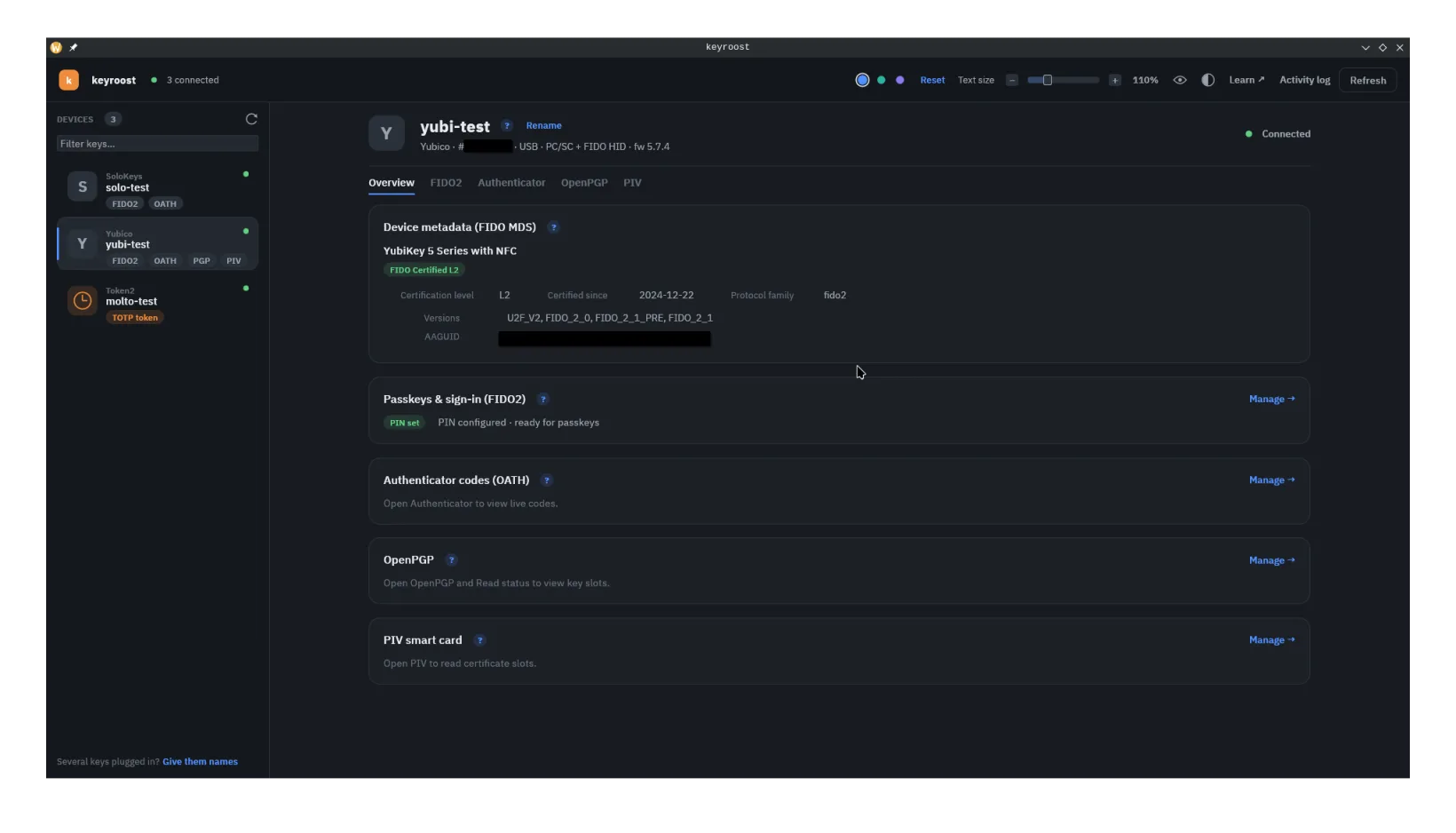
Not for everyday logins — registering a key with a website happens in your browser, no extra software required. keyroost is for managing the key itself: inspecting it, setting PINs, loading TOTP secrets, generating OpenPGP/PIV keys, and programming Token2 Molto2 tokens — over an open, auditable toolchain with no vendor SDKs. It's optional power tooling, not a requirement.
Which keys does it work with?
Any standards-compliant FIDO2 key for the FIDO features — keyroost implements the published CTAP2 spec, not vendor quirks. Hardware-verified so far: YubiKey 5 series, SoloKeys Solo 2, Nitrokey 3, Token2 PIN+ (FIDO2, fingerprints and on-device OTP), and the Token2 Molto2 and single-profile programmable tokens. The OATH, OpenPGP, and PIV commands are built to the published specs and apply to any key exposing those applets over PC/SC, verified on a YubiKey 5 — on PIN+ keys those three are not yet exercised on that hardware by this project, so treat them as experimental there. Full device table →
Text input in the desktop app misbehaves on my Linux session
On some Wayland compositors — notably KDE Plasma — GUI text fields can drop or
mishandle keystrokes. Launch the app with KEYROOST_X11=1 set to force
it onto XWayland, which resolves the input handling.
The desktop app exits on its own after being left open for hours (Linux)
On Wayland, an app left idle for hours can be killed by the compositor with
Protocol error … wl_registry — typically when a monitor sleeps or
reconfigures at just the wrong moment. This is a known race in the Wayland
protocol itself, not something keyroost can prevent; a protocol-level fix
(wl_fixes) is rolling out across compositors and GUI toolkits.
It's harmless: everything lives on your keys, so nothing is lost — just reopen
the app. If you want it to survive long idle periods today, launch it with
KEYROOST_X11=1; the XWayland path is unaffected.
Why does Windows ask for administrator rights?
Windows reserves raw FIDO access for elevated processes, so the FIDO2 features need an administrator session — keyroost detects this and offers to relaunch elevated or open Windows' own security-key settings. Everything that runs over the smart-card interface (OATH, OpenPGP, PIV, Molto2) works without elevation. Elevate for the FIDO operation you need, then drop back.
06Install keyroost
keyroost ships a desktop app (keyroost) and a command-line tool
(keyroostctl) for Linux, macOS, and Windows. Pick whichever channel fits;
they all install the same open-source toolchain.
Linux — desktop app
Flatpak is the easiest route for a non-technical user: it
auto-updates and bundles everything the GUI needs. Add both remotes in the same
(--user) scope:
flatpak remote-add --if-not-exists --user flathub https://dl.flathub.org/repo/flathub.flatpakrepo
flatpak remote-add --if-not-exists --user keyroost https://framefilter.github.io/keyroost-flatpak/keyroost.flatpakrepo
flatpak install --user keyroost io.github.framefilter.keyroost
AppImage needs no installation — download
keyroost-x86_64.AppImage from the latest release, make it executable, and
run it. (It uses the host's pcsc-lite, so install that first — see the note below.)
The smart-card features (OATH, OpenPGP, PIV, Molto2) need the host's
pcscd daemon installed and running — sudo apt install pcscd
(or your distro's equivalent), then sudo systemctl enable --now pcscd.
Talking to a key's FIDO interface needs the bundled udev rules so the
device node isn't root-only: copy udev/70-keyroost-fido.rules into
/etc/udev/rules.d/, then sudo udevadm control --reload-rules
&& sudo udevadm trigger and re-plug the key. After installing,
keyroostctl doctor verifies both. Both are two-minute setups —
full
notes in the README.
Arch Linux — AUR
The keyroost-bin package installs both binaries and the FIDO
udev rules in one step. Use any AUR helper (or makepkg):
yay -S keyroost-binmacOS & Linux — Homebrew
brew tap framefilter/keyroost
brew install keyroost
Windows — winget
winget install Framefilter.KeyroostEverything else — Cargo or pre-built archives
With a Rust toolchain (1.92+, for the GUI) you can build both binaries from crates.io.
On Linux this needs the PC/SC dev package, and the GUI needs the X11/Wayland/GL
libraries eframe/egui link against:
sudo apt install libpcsclite-dev libxkbcommon-dev libwayland-dev libxcb1-dev libgl1-mesa-dev
cargo install keyroostctl keyroost
(For the CLI alone, libpcsclite-dev is enough — cargo install keyroostctl.
Fedora/Arch package names are in the
README.)
Or grab a pre-built archive for your platform from the releases page.
Full, canonical install notes live in the project README; this is the short version.
07Mini-glossary
- FIDO2 / WebAuthn / CTAP
- The modern passwordless standard. WebAuthn is the browser-to-website half; CTAP is the browser-to-key half; "FIDO2" is the two together.
- U2F
- The original second-factor-only predecessor to FIDO2. Still works; FIDO2 is the superset.
- TOTP / HOTP (OATH)
- Time- and counter-based one-time passwords — the 6-digit codes, defined in RFC 6238 and RFC 4226.
- PIV
- A US-government smart-card standard (NIST SP 800-73) for certificates and keys; widely used for SSH, login, and signing.
- OpenPGP card
- A standard for an on-card PGP keypair — sign/encrypt email, files, git, and SSH.
- Attestation
- A signed statement a key can make about what model it is, so an organization can require approved hardware.
08Authoritative resources
Primary sources — standards bodies and the people who wrote the specs.