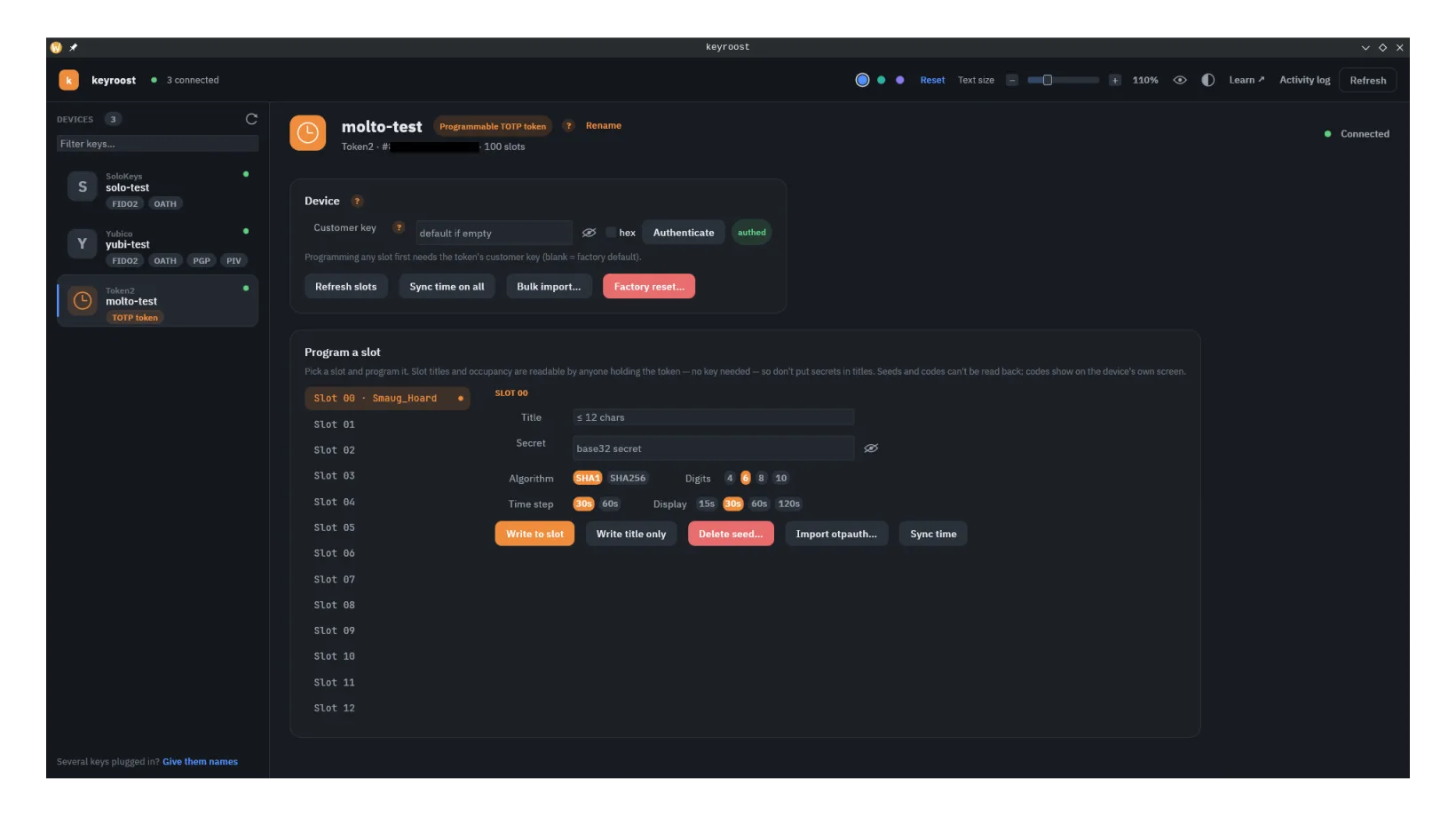
What it is
The Molto2 / Molto2v2 is a standalone TOTP token. You load account seeds into numbered slots, and the device displays the current code for each — entirely offline. Unlike a phone authenticator, there's no OS to compromise and nothing syncing to a cloud; unlike a single-account token, it holds many. It programs over a smart-card (PC/SC) interface.
keyroost's Molto2 support was built by observing the device protocol and its public
reference tool — it is not a fork of any vendor software. The wire format, SM4-CBC
MAC, and config TLV are documented in the project's PROTOCOL.md.
Programming & importing
Load a single slot from an otpauth:// URI, or migrate a whole set of
accounts at once:
- Aegis export (plaintext or encrypted)
- 2FAS export
- a list of
otpauth://URIs - a QR code in a PNG/JPEG screenshot, including a Google Authenticator export (most desktop builds can also capture one from the screen)
In the desktop app, click Import file… in the Molto2 view (it was Bulk import…), or drop the file on the window. The same Import authenticator codes dialog is used for every key that stores codes: it lists the entries, lets you pick the Molto2 under Add to and the first slot to fill, and shows what each slot will get before anything is written. If the Molto2 isn't unlocked yet, the dialog has an Authenticate button.
Entries fill consecutive slots from the first one. A slot already in use is replaced, and the preview marks it. An entry the Molto2 can't store (for example a SHA-512 code, a 45-second period, or a counter-based HOTP code) is skipped with the reason, and the rest are still written. An entry with no issuer or account is skipped without using up a slot, and entries past slot #99 are skipped. keyroost writes one slot at a time and stops at the first error, saying what was written.
keyroostctl molto import -i export.json --slot 90 --dry-run   # preview; writes nothing
keyroostctl molto import -i export.json --slot 90             # asks once, then writes
keyroostctl molto import -i export.json --file-password env:EXPORT_PW   # encrypted Aegis export
The dry run reads which slots are in use from a connected Molto2 (no
customer key needed) and also works with none connected. An encrypted export's
password comes from --file-password env:NAME or
--file-password stdin, or a terminal asks for it; with
--customer-key stdin too, the customer key is the first line and the
export's password the second.
keyroost can also sync the device clock to the host — important, because TOTP depends on accurate time, and a drifted clock shows wrong codes.
The customer key
Writes that program the Molto2 (seed, title, settings, key rotation) are authenticated with a device customer key — a secret that gates programming. Those commands are wrapped in an SM4-CBC MAC keyed by it. Deleting a slot's seed is accepted without the key.
- keyroost can rotate the customer key to a value you control.
- Treat it like any other key secret: if you lose it you may be unable to reprogram the device without a factory reset.
- As with all secrets, provide it via the environment/stdin paths keyroost exposes — never on the command line, and the tool won't print it back.
Rotating the customer key or factory-resetting the token changes what it will accept. A factory reset wipes the loaded profiles and restores the default customer key, and the token makes you confirm it with its own button. Make sure you can re-derive every seed before you do either. See resetting →
What keyroost does with the Molto2
Read slot occupancy and titles; program a slot from an otpauth:// URI;
set a slot's title or delete its seed (the title stays); import from Aegis / 2FAS / an
otpauth:// list or a QR screenshot; sync the host clock; rotate the customer key; and
factory-reset — over a pure-Rust protocol layer (SM4, SHA-1, APDU builders, MAC)
with no external crypto dependencies.
On the command line, writing to a slot that already holds a seed, importing a file
(molto import --in), deleting a seed and molto reset name the
token and ask y/N first. A
script, or a command whose seed is piped in, adds --yes. With several
Molto2 tokens connected, a terminal shows a numbered list to pick from and a script
names one with --device (the number keyroostctl list shows,
or either serial keyroost shows for the token: the one in keyroostctl
list or the one molto info prints) or --reader; keyroost never uses the first one it finds. Molto2 tokens
can't be given a friendly name yet.
The single-profile siblings (OTPC, miniOTP, C30x)
The Molto2 holds many accounts; Token2 also makes a family of single-profile programmable tokens that hold exactly one. These are card- and fob-shaped tokens — OTPC-P1-i / OTPC-P2-i, miniOTP-2-i / miniOTP-3-i, C301-i, and C302-i — that show one rolling code on a small display. keyroost programs them over the same kind of smart-card (PC/SC) interface as the Molto2, over a contactless or contact (chip) reader.
- Write the TOTP seed for the single account the token carries.
- Set the configuration — HMAC algorithm (SHA1 / SHA256), period (30 s / 60 s), and display timeout — and sync the device clock to the host.
- keyroost reads back the device serial and model and refuses to program a token whose serial doesn't match a known model.
Unlike the Molto2, these tokens don't have a per-device customer key. They
authenticate with a single fixed device key, so there's nothing to rotate or lose —
but equally, anyone with physical access and a reader can reprogram one. The wire
protocol (a close relative of the Molto2's, same SM4 cipher and MAC) is documented
independently in the project's PROTOCOL-token2prog.md.
From the CLI: keyroostctl prog info (serial, model, on-device clock),
keyroostctl prog seed set (asks for the seed at a hidden prompt, or in a
script takes --seed env:NAME or --seed stdin, so it stays
out of ps and shell history; base32 unless --encoding hex), and
keyroostctl prog config set (algorithm, --period, display timeout).
Both ask y/N before overwriting
(a script adds --yes), and only programmable tokens are considered when
keyroost picks the token. The GUI offers the same on a dedicated programmable-token
pane.
Troubleshooting
These are behaviors of the Molto2 hardware and the smart-card layer, not bugs in keyroost — any smart-card software talks to the token the same way and sees the same thing.
The token stops charging while it's plugged into a computer
The Molto2 stops charging the moment your operating system's smart-card
service enumerates it — on Linux, when pcscd brings up the card
interface. This happens as soon as the token is detected, before any program
authenticates or writes to it, so no particular application causes it. To
charge the token, use a plain USB power source — a charger
or power-only cable with no computer attached. (On a nearly full battery it
tops off in about half a minute and then stops, which is normal.)
The token isn't detected / doesn't show up
The Molto2's card interface sometimes fails to initialize on first contact, so the token is present on USB but no smart-card reader ever appears. Each initialization attempt is a fresh roll of the dice:
- Power the token off (unplug and leave it unplugged for ~10 seconds — a failed session can leave its card interface wedged, and only a power-off clears that).
- Plug it back in and give it a few seconds, then check
with
keyroostctl list(the app's device list updates by itself). - Still missing? Just replug again. It can take two or three cycles.
First, rule the token out — these two checks are quick and, if both pass, the hardware and the driver are fine and the problem is the service:
- Is it on USB at all?
lsusbshould list349e:0300 TOKEN2 Molto2. If it doesn't, that's a cable, port or power problem, not a smart-card one. - Does the CCID driver claim it? The token must appear in
the driver's device list — on Linux,
grep -A1 0x0300 /usr/lib/pcsc/drivers/ifd-ccid.bundle/Contents/Info.plistalongside vendor0x349E. Recent libccid ships it as TOKEN2 Molto2.
It's on USB and the driver supports it, but no reader ever appears
Then the smart-card service is very likely not running long enough to keep
trying. Debian, Ubuntu and Fedora all start pcscd
on demand (pcscd --foreground --auto-exit,
launched by pcscd.socket): it wakes when a program asks for a
reader and exits again shortly after. That interacts badly with a token that
needs more than one attempt:
- While the service is stopped, replugging achieves nothing — there is no running service to notice the token, so the retry you think you're triggering never happens.
- Every command you run cold-starts the service, and that cold start is exactly the first-contact attempt most likely to time out.
The result is a token that can sit unnoticed for days through any number of power-cycles. Give the service a longer life and it gets the retries it needs:
sudo systemctl disable --now pcscd.socket
sudo systemctl enable --now pcscd.service
To go back to on-demand starting, swap the two:
sudo systemctl disable --now pcscd.service && sudo systemctl enable
      --now pcscd.socket
. This is a property of how your distribution starts
the smart-card service, not of keyroost — every smart-card program on the
machine is affected the same way.
Restarting pcscd can't help here — it only retries a token's
initialization when the token is plugged in — and restarting it while
the token has a healthy, active connection pulls the card interface
out from under it and hangs the firmware: the screen freezes. If that
happens, power-cycle the token (turn it off and back on)
and it comes back cleanly.
I programmed a slot but it doesn't show a code
A slot shows a rolling code only once it has a seed (the TOTP secret). Writing only a title sets a label and nothing else — use the full write (seed + title + settings), not the title-only action, when you want the slot to generate codes.
Can anyone read my slot titles without the customer key?
Yes. The Molto2 answers title and occupancy reads without the customer key, so anyone with physical access to the token can list which slots are used and how they're labeled. Don't put secrets in slot titles. Seeds and codes are never readable back off the device.
Authoritative resources
From the command line: see Authenticator codes on a key and Import codes from an authenticator app on the Command line page.