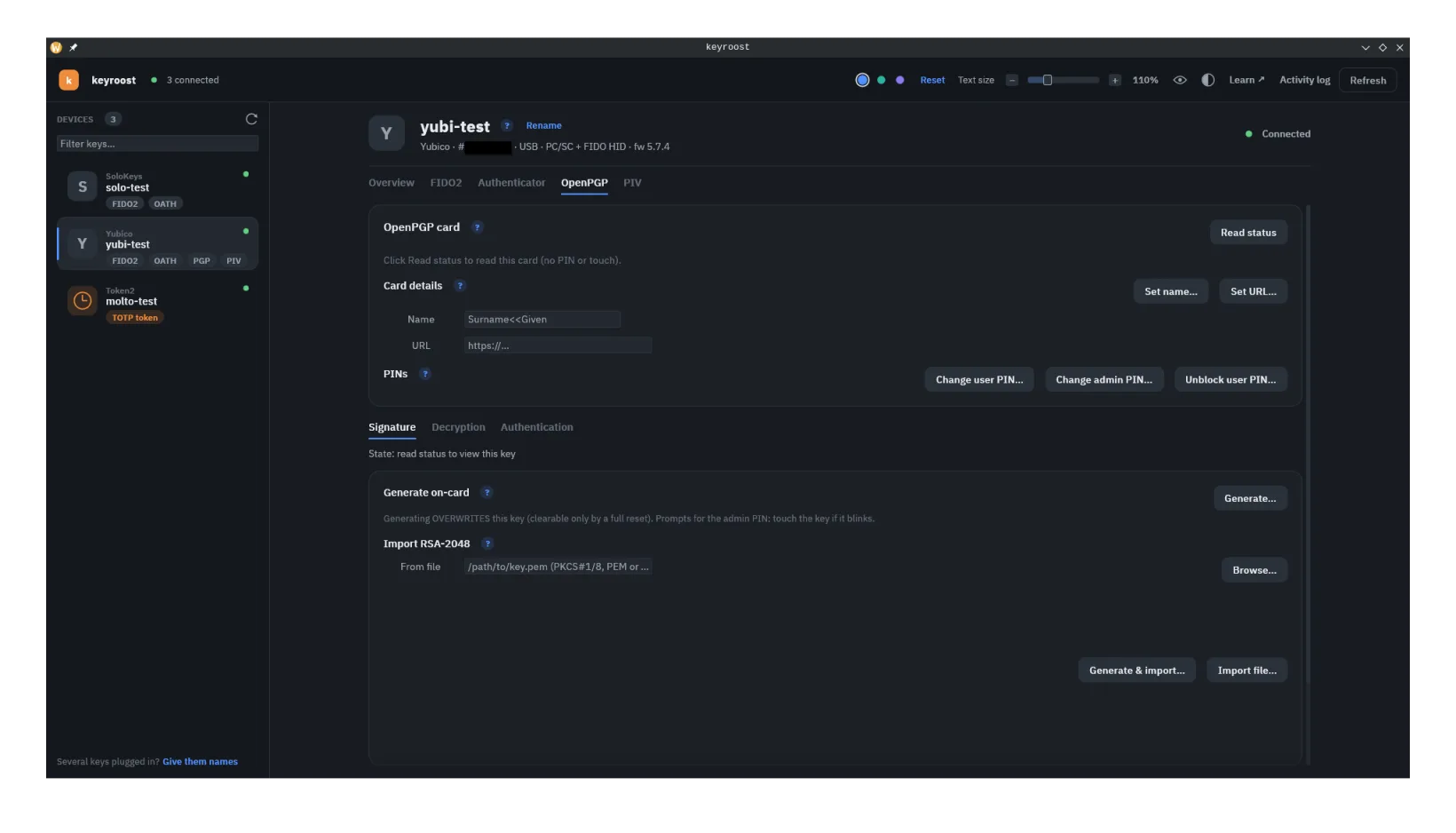
What it is
The OpenPGP Card (v3.4) is a smart-card application that holds up to three private keys and performs operations with them on-device:
- Signature key — sign email, files, and git commits/tags.
- Encryption key — decrypt messages and files addressed to you.
- Authentication key — commonly used for SSH login.
The card does the signing and decrypting itself, so a compromised laptop can ask the card to sign or decrypt while it's present, but can't read the keys out of it. A key generated on the card never leaves it; a key made on the computer with a backup, or imported from a file, also exists in that file, so keep the file safe.
Three ways to put keys on the card
- Generate on the card — the key is born inside the device and no copy can exist anywhere. Nothing to leak, but if the card is lost, broken or reset, the key is gone for good. That matters most for the decryption key: without it you can no longer read messages that were encrypted to you.
- Create keys with a backup — keyroost makes all three keys on your computer, saves them to a file that opens only with a passphrase you choose, loads them onto the card, and then forgets them. Keep the file offline (a USB stick in a drawer works), and you can load the same keys onto a spare card later. This is the recommended choice for most people. Details ↓
- Import a file — load a key you made somewhere else, for example with GnuPG: an RSA key file (PEM or DER, 2048, 3072 or 4096 bits) or the matching key from an OpenPGP file. The key existed outside the card first, so keep that in mind.
In the app, open the OpenPGP tab, then the OpenPGP card card. The Keys row has Create keys with a backup…, Restore a backup… and Change expiry date…; each key's own tab (Signature, Decryption, Authentication) offers Generate on-card and Import from a file. Writing a key replaces whatever was in that slot, and needs the admin PIN.
The card uses a user PIN (day-to-day) and an admin PIN (management), each with its own retry counter that locks the function after too many wrong tries. How key PINs work →
Keys with a backup
Create keys with a backup asks for a name, an email address (optional), a key type, an expiry date and a passphrase, then creates the signature, decryption and authentication keys together and writes three files next to each other:
| File | What it is | What to do with it |
|---|---|---|
NAME.asc | The backup: your secret keys, protected by the passphrase. GnuPG can read it. | Keep it offline, with the passphrase stored separately. Anyone with both can act as you. |
NAME.pub.asc | Your public key. | Share it freely: send it to correspondents, put it on your website, or import it into GnuPG. |
NAME.rev.asc | A revocation certificate: a signed statement that the key should no longer be trusted. | Keep it offline. Import it into GnuPG and publish it only if the key is lost or stolen. |
keyroost never overwrites an existing file; if one with that name is already there, it stops and names it.
Key types. RSA-2048, RSA-3072, RSA-4096, NIST P-256, P-384, P-521, secp256k1 and Curve 25519 (Ed25519 for signing and authentication, X25519 for decryption). The default is Curve 25519 when the card lists it (or does not publish a list), otherwise RSA-3072 when the card lists it, otherwise the first type the card lists; types the card doesn't list are not offered. Brainpool curves can be generated on the card but not made with a backup.
Restore a backup. If the card is lost, broken or reset, or you want a
spare, Restore a backup… loads the keys from NAME.asc
— or from a file exported by GnuPG with
gpg --export-secret-keys --armor — onto a card. You choose which of
the keys to load; each replaces the key in its slot. It needs the backup's passphrase
and the card's admin PIN. A wrong passphrase, an unreadable file or a key type the card
does not list is reported in one line before anything is written, so the card stays as
it was. If the card does not accept a key type in a slot, keyroost says so, and a backup
already written stays where it is. If loading fails after the card began replacing a
key, keyroost names that slot: its old key may be gone.
Using it with GnuPG
gpg --import NAME.pub.asc     # your public key
gpg --card-status             # links the card's keys to it
Alternatively, on an offline machine you trust, gpg --import NAME.asc
(it asks for the passphrase) to hold the secret keys in GnuPG itself.
From the command line
keyroostctl openpgp key import --generate --backup alice --name "Alice Example" --email alice@example.com --algorithm ed25519 --expires 3y
keyroostctl openpgp key import --in alice.asc          # restore onto a card
The key-type values and prompts are listed on the Command line page. The old “Generate & import” choice, which made a key on the computer and discarded it after loading, has been removed: it left no way to recover the key, so use Create keys with a backup or Generate on-card instead.
Expiry date
An OpenPGP key carries an expiry date in its public key. After that date, other people's
software stops encrypting to it and treats its signatures as expired. The keys on the
card are unchanged; only the public key's date moves. When you create keys, the choices
are Never, 1, 2, 3
(the default, as in GnuPG 2.4) or 5 years, or a date picked from the
calendar or typed as YYYY-MM-DD. As in GnuPG, a date means the key expires
at midday (UTC) on that day, so it shows the same date in nearly every time zone.
Renewing. Open Change expiry date… and choose
how to sign the change: with the card (needs the user PIN) or with the backup (needs its
passphrase, so the card need not be present; the backup file is updated too). Choosing Never removes the
date. Afterwards, share the updated public key again (send, publish or re-import it) so
others see the new date. keyroost reads the public key and the backup armored or binary
(as GnuPG exports them) and writes them back armored. With GnuPG alone, gpg --quick-set-expire FINGERPRINT 3y
does the same job.
keyroostctl openpgp key expiry --set 2y --public alice.pub.asc                    # signed by the card
keyroostctl openpgp key expiry --set never --public alice.pub.asc --backup alice.asc    # signed with the backup
Which keys support it
Importing keys, which backups and restores rely on, uses the OpenPGP card's standard key-import command. What each device accepts depends on its model and firmware. Cards that publish a list of accepted key types show it in keyroost; others are simply tried and report an error if they cannot take a type. From the vendors' own documentation:
| Device | Key types listed by the vendor | Source |
|---|---|---|
| Token2 PIN+ / T2F2, Release 3 | RSA-2048; NIST P-256/384/521; secp256k1 | Token2 support matrix |
| Token2, Release 3.1 and later | Adds RSA-3072/4096 and Curve 25519 | Token2 support matrix |
| YubiKey 5, firmware 5.2.3 and later | RSA-2048/3072/4096; NIST P-256/384/521; secp256k1; Brainpool; Curve 25519 | Yubico |
| Nitrokey 3 | RSA-2048/3072/4096; NIST P-256/384/521; secp256k1 (firmware 1.8.2 and later); Brainpool; Curve 25519 | opcard-rs |
| CanoKey | RSA-2048/3072/4096; NIST P-256/384/521; secp256k1; Curve 25519 | CanoKey docs |
| Nitrokey Start | RSA up to 4096; ECC: P-256, secp256k1, Ed25519, X25519 | Nitrokey FAQ |
Vendors differ in which limits they document, and firmware changes them, so check your card's own list in keyroost. If a card refuses a type, keyroost names the type and the slot.
What keyroost does with OpenPGP
Read card status and a slot's public key, and verify
a PIN without changing anything; generate keys on-card in any
algorithm the card accepts — RSA 2048/3072/4096, Ed25519, X25519, NIST P-256/384/521,
secp256k1, brainpool — the choice offered from the card's own algorithm list
(keyroostctl openpgp key algorithms), or import keys — an RSA key file (PKCS#1/PKCS#8 PEM/DER, 2048 to 4096 bits) or a backup (see Keys with a backup) — for the sign, decrypt, or
auth slot (--slot decrypt, --slot auth);
sign (SHA-256 or
SHA-1), decrypt, and authenticate (client/SSH
signature with the Authentication key); set cardholder name / URL; register a key for
GnuPG; change the user or admin PIN and unblock a
locked PIN (via the admin PIN / PW3); and factory-reset the applet. The
output of sign/authenticate is the card's raw signature:
PKCS#1 for RSA, r||s (not DER) for ECDSA, R||S for
Ed25519.
keyroostctl openpgp info --device my-yubikey
keyroostctl openpgp key generate --slot sign --algorithm ed25519 --device my-yubikey   # asks y/N, then for the admin PIN
keyroostctl openpgp sign --in msg.txt --device my-yubikey          # asks for the PIN
keyroostctl openpgp authenticate --in chal.bin --device my-yubikey
keyroostctl openpgp pin change --device my-yubikey                 # the user PIN
keyroostctl openpgp pin change --admin --device my-yubikey         # the admin PIN
keyroostctl openpgp key generate --slot sign --algorithm ed25519 --yes --admin-pin env:ADMIN_PIN   # in a script
key generate, key import and
reset name the key and ask y/N in a terminal; with the admin
PIN piped in, or in a script, add --yes. pin change and
pin verify act on the user PIN, or the admin PIN with --admin;
name set, url set, key generate and key
import take the admin PIN as --admin-pin, and pin
unblock takes --admin-pin and --new-pin.
The card byte layer is a pure-Rust, in-tree implementation of the OpenPGP Card spec (APDU + BER-TLV); the host-side key generation, backup reading and writing, and key-file parsing use a small set of vetted cryptographic libraries. Local signature verification is not offered.
Authoritative resources
From the command line: see OpenPGP on the Command line page.