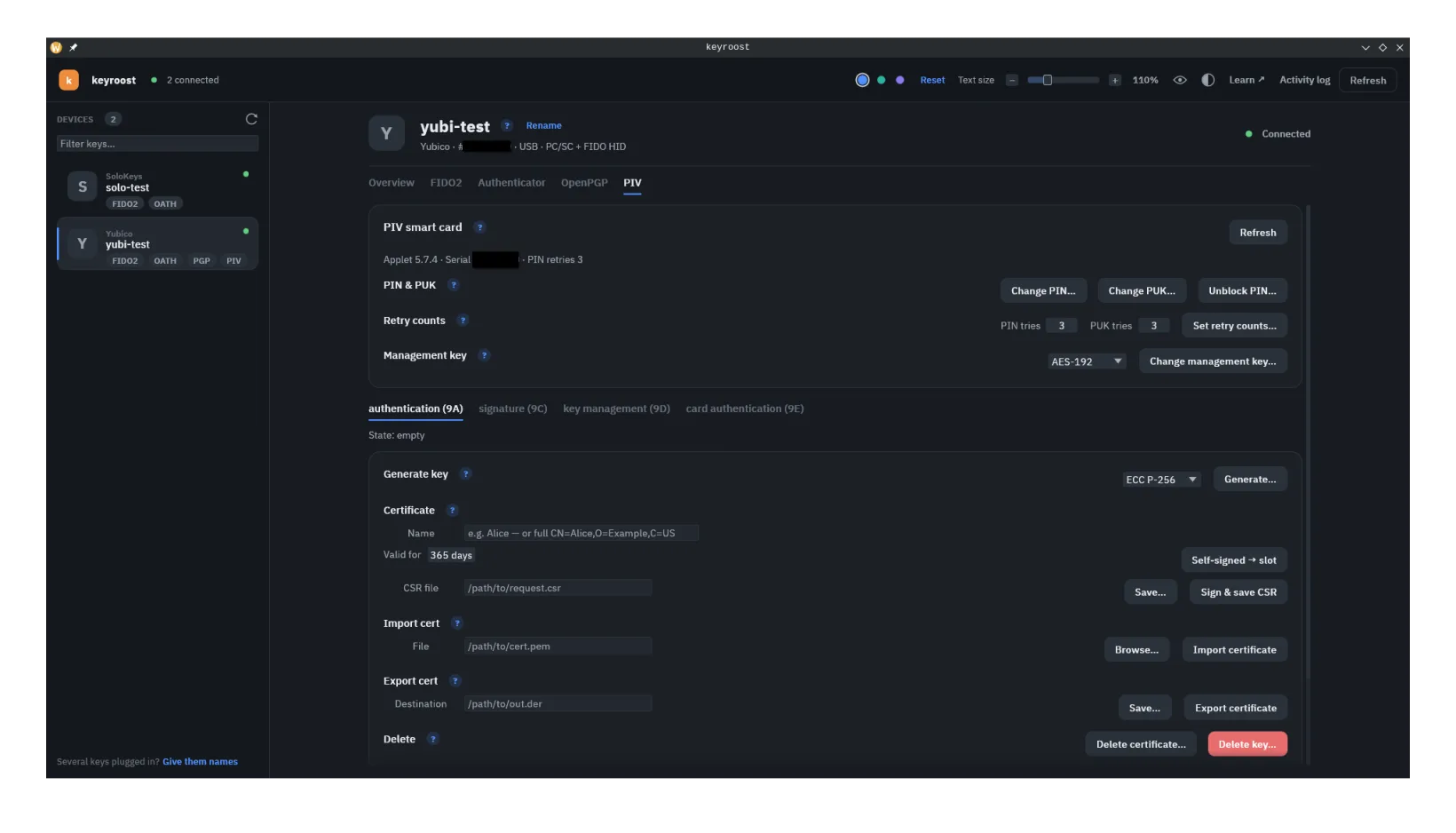
What it is
PIV (Personal Identity Verification, NIST SP 800-73-4) began as a US-government employee-credential standard and is now widely supported on general-purpose security keys. It stores certificates and private keys in numbered slots, each with an intended purpose, and performs signing/auth with them on-device — gated by a PIN, with the slots' use governed by a management key.
The common key slots
9A— PIV Authentication. Login / network auth (and a popular choice for SSH).9C— Digital Signature. Signing documents and email; typically requires a PIN per use.9D— Key Management. Encryption / key exchange.9E— Card Authentication. Often used without a PIN, e.g. physical-access scenarios.
Yubico firmware also exposes 20 retired key-management slots,
82–95. They hold decryption keys rotated out of
9D so old mail and archives stay readable, and keyroost treats them as
first-class slots: every slot-taking command accepts --slot 82 …
--slot 95, and the desktop app lists them under a collapsible
Retired slots section that reads each slot's occupancy on demand.
PIV has a user PIN plus a PUK that can reset a blocked PIN. Exhaust both retry counters and only a full applet reset can recover the card, erasing its keys and certs. Note that PIV's reset instruction is a vendor extension — SP 800-73-4 defines none — so a standards-only card that never implemented it cannot be recovered by keyroost at all once both counters are spent. keyroost's whole-device factory reset detects that case up front and refuses rather than blocking the PIN and PUK on a card it could not then wipe. See resetting →
Separate from the PIN, a third credential — the management key — gates
administrative changes: generating keys, importing certificates, and changing retry
counts. Cards ship with a well-known factory default
(010203…0708, repeated to fill the key), so anyone can administer a
fresh card. If you rely on PIV day-to-day, change it — keyroost can rotate it to a
random value you keep somewhere safe (a password manager). Lose a changed key and
no admin changes are possible until a full applet reset.
What keyroost does with PIV
Full management. Status (version, serial, PIN retries, slot contents) needs no PIN. Beyond that, keyroost generates keys on the card (RSA 1024–4096, ECC P-256/P-384, Ed25519, X25519), creates a self-signed certificate in the slot or a certificate request (CSR) for a certificate authority — signed by the card itself, the private key never leaves it — imports and exports certificates, changes the PIN, PUK, retry counts and management key, moves a key between slots, clears a slot's certificate or key, tests that a slot's key still works, writes a fresh CHUID, and resets the applet. The same controls are in the desktop app's PIV pane.
keyroostctl piv status
keyroostctl piv generate-key --slot 9a --algorithm eccp256 --mgmt-key-stdin
keyroostctl piv self-sign --slot 9a --subject "CN=Alice" --days 365 \
    --pin-stdin --mgmt-key-stdin
keyroostctl piv request-cert --slot 9a --subject "CN=Alice,O=Example" \
    --pin-stdin --file request.csr
When two --*-stdin flags appear on one command, keyroost
reads them as consecutive lines in the order the operation needs them — for
self-sign that is the management key first, then the PIN.
Both commands take --generate-key to generate the slot's key in the
same step (with the same --algorithm, --pin-policy and
--touch-policy options as generate-key), which spares
cards without GET METADATA the save-pubkey / load-pubkey detour.
Clearing a slot. delete-cert removes only the slot's
X.509 certificate object and leaves the private key in place — standard PIV, so it
works on every card. delete-key permanently erases the slot's private key
(a Yubico extension that needs YubiKey firmware 5.7 or newer; older cards can't delete
a key — overwrite the slot with a fresh generate-key instead). Both need
the management key and are destructive, so they require an explicit --yes.
keyroostctl piv delete-cert --slot 9a --mgmt-key-stdin --yes
keyroostctl piv delete-key  --slot 9a --mgmt-key-stdin --yes   # YubiKey 5.7+
Moving a key between slots. move-key relocates a slot's
private key without exporting it — the Yubico MOVE KEY instruction, so it needs YubiKey
firmware 5.7 or newer. It is non-destructive: keyroost refuses an occupied
destination rather than overwriting it, refuses a same-slot move, and the source slot's
X.509 certificate object stays where it is (move the certificate separately with
export-cert + import-cert if you want it to follow). Both the
standard and the retired slots are valid on either end, which makes archiving a
superseded 9D decryption key into a retired slot a single command. The
desktop app offers the same thing as Move key….
keyroostctl piv move-key --from 9d --to 82 --mgmt-key-stdin   # archive a rotated key
keyroostctl piv move-key --from 82 --to 9d --mgmt-key-stdin   # bring it back
Testing a slot's key. test proves a slot's private key
still works end to end, without changing anything on the card. keyroost reads the
slot's certificate, takes its public key, and builds a fixed challenge from it; the
card then runs every private-key operation the key's algorithm supports and keyroost
verifies each result against that same public key. The operations depend on the key
type — decrypt for RSA, key-agree (ECDH) for
P-256 / P-384 / X25519, and sign for
RSA / ECDSA / Ed25519 — and an operation the key can't do is
reported as skipped, not failed. It needs the PIN unless the slot's PIN
policy is never (typically 9E), in which case leave the PIN
flags off; a PIN-per-use slot such as 9C is re-verified before each
operation. The challenge is deterministic — sliced from one built-in constant — so a
run is fully reproducible and pulls in no randomness. The desktop app offers the same
thing as Test… in the slot pane, just below Delete; the button is
live only when the slot holds a certificate with a key type keyroost can test.
keyroostctl piv test --slot 9a --pin-stdin
keyroostctl piv test --slot 9e                 # PIN policy "never" — omit the PIN
keyroostctl --json piv test --slot 9c --pin-env PIV_PIN
The command prints one line per operation —
Decrypt: passed, Sign: FAILED — …,
Key Agree: skipped — not supported for … — and exits non-zero if any
operation failed. With --json it emits
{ slot, algorithm, ok, operations: [ { operation, result } … ] } instead.
A slot with no certificate, or a key type keyroost can't verify, is an error — nothing
is tested.
Writing a new CHUID. new-chuid writes a fresh Card Holder
Unique Identifier with a randomly-generated GUID (or one you supply with
--guid). Windows' PIV minidriver caches a card's contents keyed by the
CHUID's GUID, so after reprovisioning a card Windows can keep showing stale data until
the GUID changes — a new CHUID forces it to re-read the card. It needs the management
key. The desktop app offers the same thing as New CHUID in the card
settings.
keyroostctl piv new-chuid --mgmt-key-stdinBulk / scripted provisioning — use the CLI
The desktop app collects the management key (and PIN) per operation and wipes the secret from memory as soon as that operation finishes — a deliberate security choice. For a single slot that's ideal. For provisioning several slots, or many keys, re-entering the management key on every step gets tedious fast.
For batch work the CLI is the intended path. The management key and
PIN come from environment variables or stdin once, so a shell loop can
provision every slot without re-entry. Keep the secrets out of argv —
always use the --mgmt-key-env / --mgmt-key-stdin and
--pin-env / --pin-stdin flags (never pass them as plain
arguments), so they never appear in your shell history or the process list.
# management key + PIN supplied once via env; the loop provisions each slot.
# (set these in your own shell; don't commit or echo them)
export PIV_MGMT=010203040506070801020304050607080102030405060708   # AES-192 / 3DES key, hex
export PIV_PIN=123456

for slot in 9a 9c 9d 9e; do
  keyroostctl piv generate-key --slot "$slot" --algorithm eccp256 \
      --mgmt-key-env PIV_MGMT --reader yubikey
  keyroostctl piv self-sign --slot "$slot" --subject "CN=$USER" --days 365 \
      --mgmt-key-env PIV_MGMT --pin-env PIV_PIN --reader yubikey
done

unset PIV_MGMT PIV_PIN   # clear the secrets when you're done
If a certificate authority issues your certificates, replace the
self-sign step with request-cert — note it takes no
--days, and no management key unless you add --generate-key
— the CSR signature itself needs only the PIN; the management key is for the
key-generation step:
  keyroostctl piv request-cert --slot "$slot" --subject "CN=$USER" \
      --pin-env PIV_PIN --file "slot-$slot.csr" --reader yubikey
Import each issued certificate later with
import-cert --slot "$slot" --file … --mgmt-key-env PIV_MGMT.
Use --reader <substr>
(or --device with a friendly name) to pin the loop
to one device when several are plugged in.
None of this replaces the desktop app — provisioning a slot or two there is perfectly comfortable. The CLI just earns its keep when you're scripting many slots or many keys and don't want to re-enter the management key each time.
Errors and diagnostics
When the card rejects a command, keyroost appends the ISO 7816 status word's
plain-language meaning to the error, e.g. device rejected piv delete key: SW=6D00
(instruction not supported or invalid) — no lookup table needed to make sense of a
failure.
On a contact or NFC reader that negotiates the older T=0 protocol, certificate import and on-card signing used to fail with a PC/SC "transaction failed" error, because T=0 can't carry the large commands those operations need. keyroost now reads the negotiated protocol and chains large commands from the start on T=0 links, so this no longer happens.
The desktop app's activity log (opened from the top
bar, and detachable into its own window) lists every action, distinguishing what you
triggered from background reads. Turn on its APDU trace checkbox before
an operation to have it also record the exact commands and responses exchanged with the
card — the same detail --debug prints on the CLI — with
Clear to empty the log and Copy to take a trace
elsewhere.